
188PKR Deposit & Withdrawal – Complete Guide for 2026
If you are new to 188PKR and want to understand how deposit & withdrawal work, this guide can help. Knowing how to add funds and request a withdrawal makes it easier to use the platform without confusion. The process may look complicated at first, but the basic steps are simple when you follow them carefully.
This guide explains the main payment options, how to make a deposit, how to request a withdrawal, and what to check before moving money. Payment methods, limits, and processing times can change, so always check the latest information shown inside your account before making a transaction.
What Are 188PKR Deposit and Withdrawal?
A deposit means adding money to your 188PKR account so you can use the available paid features or games. You select a payment method, enter the amount, complete the transaction, and then wait for your balance to update.
A withdrawal works in the opposite direction. It allows you to request money from your available balance and send it to a supported payment account. Think of it like moving money between two wallets, with the platform handling the request in between.
Always make sure your account and payment details are correct before confirming either type of transaction.
188PKR Deposit Methods
The payment options available to users can depend on the current platform setup. Pakistani users may see local options such as JazzCash and EasyPaisa, while other methods may also be available.
Before making a deposit, open the payment section in your account and check which options are currently displayed. Do not rely on old screenshots or information from another version of the platform.
Common options may include:
- JazzCash
- EasyPaisa
- Bank transfer
- Other payment methods shown in the account
Only use a payment account that belongs to you and carefully check the details before sending money.
How to Deposit Money in 188PKR Game (Step-by-Step Guide)
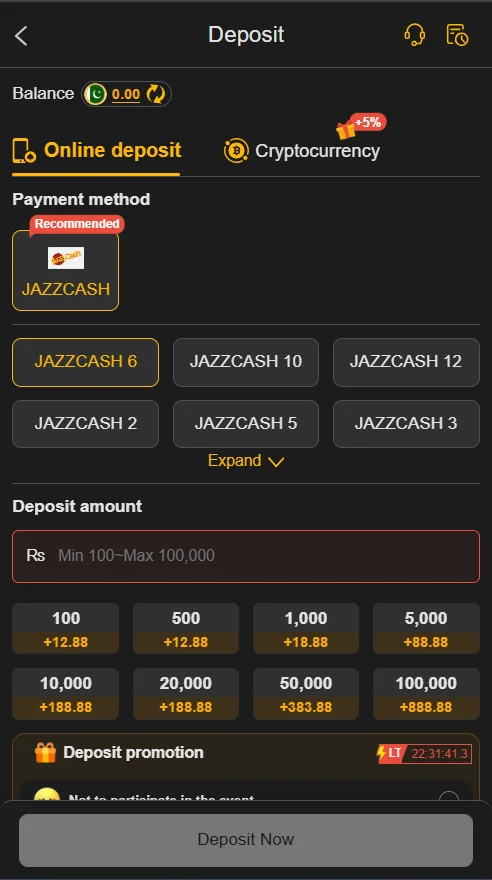
Adding funds is generally a straightforward process. Start with an amount you are comfortable using and follow the instructions shown by the platform.
Step 1: Open Your Account
Log in to your 188PKR account using your registered details. Make sure you are using your own account before starting a transaction.
Step 2: Choose Deposit
Find the Deposit, Recharge, or similar option in your account. Tap it to open the available payment methods.
Step 3: Select a Payment Method
Choose one of the payment options available to you. If you use JazzCash or EasyPaisa, carefully check the account information shown before completing the payment.
Step 4: Enter the Amount
Enter the amount you want to deposit. Check the minimum and maximum limits displayed on the payment page before continuing.
Step 5: Confirm the Payment
Complete the transaction through your selected payment method. After payment, return to the platform and check whether your balance has been updated.
If the balance does not appear immediately, avoid sending another payment straight away. First check your transaction status and payment history.
Things to Check Before Making a Deposit
A few simple checks can help prevent payment mistakes. Always look at the current instructions inside your account because payment details and limits can change.
Before depositing, check:
- Your payment account details are correct.
- You have entered the right amount.
- Your payment method is currently supported.
- Your internet connection is stable.
- You understand any applicable conditions.
- You keep a record of the transaction.
It is also better to start with a small amount if you are unfamiliar with the platform.
How to Withdraw Money From 188PKR Game (Step-by-Step)
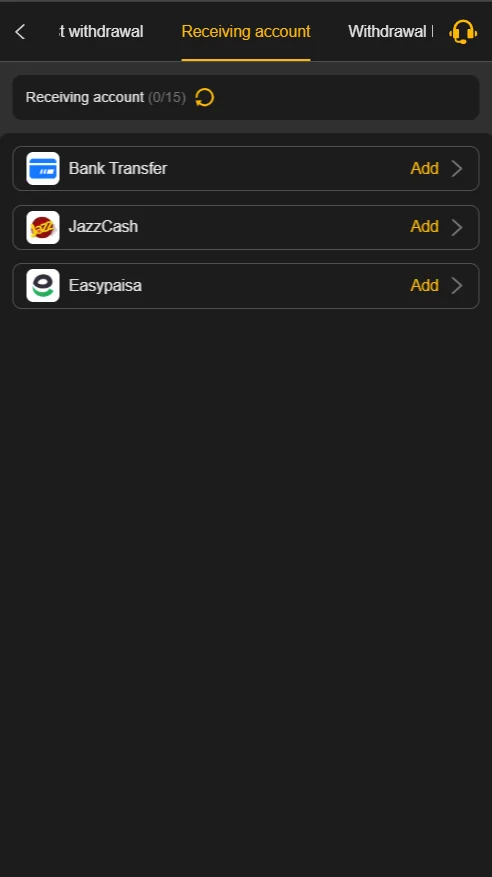
A withdrawal allows eligible funds in your account to be sent to a supported payment method. Before requesting one, check whether your account has completed any required verification and whether you meet the current withdrawal conditions.
The exact options and limits can vary, so always use the information displayed in your account rather than relying on outdated figures.
Step 1: Open the Withdrawal Section
Log in to your account and find the Withdraw or Withdrawal option. Open the section to see the available methods and limits.
Step 2: Enter Your Amount
Enter the amount you want to withdraw. Make sure it falls within the minimum and maximum limits currently shown on the platform.
Step 3: Choose Your Payment Account
Select an available withdrawal method and enter the required payment details. Where required, use an account that matches your registered information.
Step 4: Submit the Request
Review everything carefully before submitting your withdrawal request. Once submitted, keep the transaction information so you can check its status if needed.
Processing time can vary depending on the payment method, account verification, and platform processing. If a request takes longer than the stated timeframe, check its status before submitting another request.
Common Deposit & Withdrawal Problems
Payment problems can happen for several reasons and do not always mean that your money has been lost. The first step is to check your transaction details and account history.
Deposit not showing:
Wait a short while and refresh your balance. If the payment was completed but the balance remains unchanged, check the transaction status and contact the platform’s support if available.
Withdrawal still pending:
Some requests require additional processing or verification. Check the status and wait for the timeframe shown by the platform.
Payment details are incorrect:
Do not repeatedly submit transactions with incorrect information. Review your account and payment details before trying again.
Transaction failed:
Check your internet connection, payment balance, and whether the selected method is currently available. You can try again after confirming everything is correct.
Tips for Safer Deposits and Withdrawals
Handling money online requires some basic care. These habits can help reduce avoidable mistakes:
- Use your own payment account.
- Double-check every transaction before confirming.
- Keep screenshots or transaction records.
- Never share your password or verification codes.
- Avoid sending money to unofficial personal accounts.
- Check current limits before depositing or withdrawing.
- Start with small amounts if you are new.
- Never deposit money you cannot afford to lose.
If the platform involves real-money gaming, remember that losses are possible. Do not chase losses or increase your spending simply because you want to recover previous results.
Final Thoughts
The basic idea behind 188PKR deposit & withdrawal is simple: a deposit adds funds to your account, while a withdrawal sends eligible funds to a supported payment method. The important part is entering the correct information and following the current instructions shown on the platform.
Before making a transaction, check the available payment methods, limits, and any account requirements. Take your time, keep transaction records, and use real-money features responsibly.
FAQs
1. How do I add money to my 188PKR account?
Log in, open the deposit section, select an available payment method, enter your desired amount, and complete the payment according to the instructions provided.
2. Why has my deposit not appeared in my balance?
A deposit may take some time to appear because of payment processing or a temporary system delay. Check your transaction status before making another payment.
3. How can I request a withdrawal from 188PKR?
Open the withdrawal section, select an available payment method, enter the amount, provide the required details, and submit your request.
4. Why is my withdrawal taking longer than expected?
Processing can depend on the payment method, verification requirements, and platform processing time. Check the status of your request and the timeframe shown in your account.